Bans and safety
8 min read
·
Updated
What unofficial bulk senders risk, how to check a provider is genuinely official, and why the official route costs more.

Nafih C
Product team, FlowFlex

A furniture retailer in Bahrain told us his last WhatsApp tool got his number banned after about 50 messages. A prospect in Dubai showed us a quote of 70 AED for 2,000 messages. That works out to about $0.0095 a message, less than a sixth of what Meta itself charges to deliver a marketing message in the UAE.
Cheap WhatsApp bulk senders are everywhere in the GCC, and the price difference is real. So are the risks. This guide explains what unofficial tools are, what they put at stake, how to check whether a provider is genuinely official, and why the official route costs more.
Quick answer: what is the difference between official and unofficial WhatsApp bulk senders?
An official provider connects you to the WhatsApp Business API that Meta runs, through a Meta signup in your own business account, with message templates Meta approves and per-message fees Meta sets. An unofficial bulk sender automates the WhatsApp Business app or WhatsApp Web, usually through a browser extension or a QR code login. It is cheaper, but it breaks WhatsApp’s terms, can get your number banned and gives a third party access to your chats.
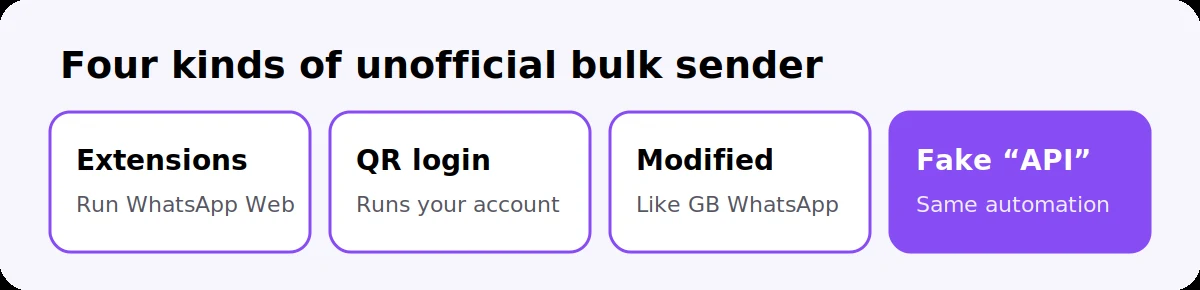
Any tool that sends messages in bulk by automating the WhatsApp apps instead of using Meta’s official API. They come in a few forms:
Browser extensions and desktop software that control WhatsApp Web and send messages one after another from your account.
QR code login services. You scan a code with your phone, and the service runs your WhatsApp as a linked device on its servers.
Modified apps such as GB WhatsApp, which WhatsApp temporarily bans on detection.
“WhatsApp API” resellers without Meta’s signup. Some sell access they call an API, but it is built on the same automation underneath.
The common sign is simple: you never log in with Facebook, never see your WhatsApp account in your own Meta Business Manager, and never get templates approved by Meta.

The biggest is losing your number, but it is not the only one.
Banned numbers. WhatsApp detects automated sending and bans the number, often without warning. It can take very little: a showroom owner in Oman lost an 8-year-old number with 4,000 contacts after sending about 25 KYC PDFs. Getting a banned number back is slow and never guaranteed, as our guide on why WhatsApp bans business numbers explains.
Breaking WhatsApp’s terms. WhatsApp’s products are not built for bulk messaging from personal or Business app accounts. Since December 2019, WhatsApp has said it will take legal action against those engaged in, or assisting others with, automated or bulk messaging that violates its terms.
Someone else reading your chats. A tool that runs your WhatsApp as a linked device can see every conversation on that number, including customer details you never meant to share.
No safety net. There are no approved templates, no quality rating to warn you and no clear opt-out handling, so customers block and report you, and nothing tells you until the ban arrives.
Nobody to call. If the tool stops working or the number is banned, there is no Meta support process behind it.
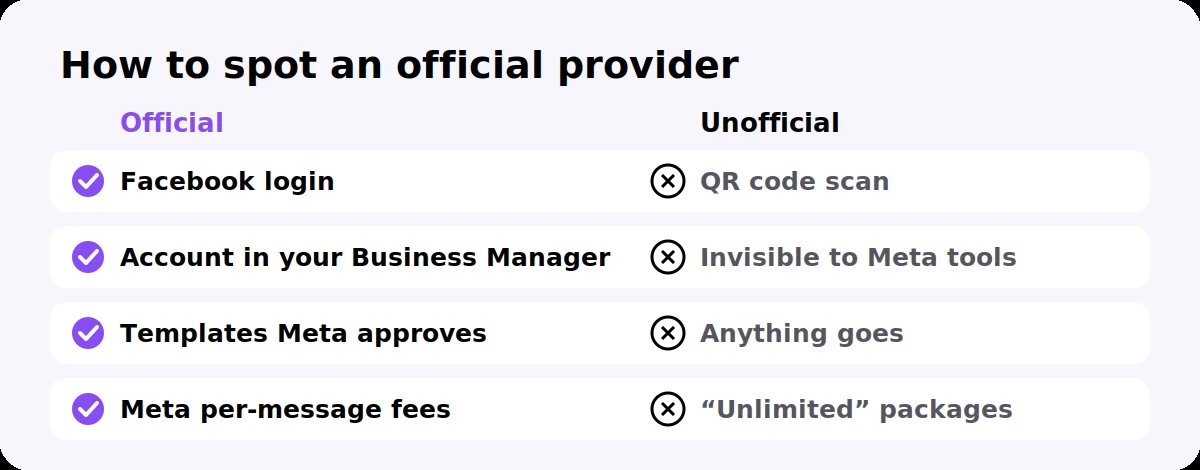
Ask to see the signup before you pay. An official provider passes all of these checks:
Check | Official provider | Unofficial tool |
|---|---|---|
How you connect | You log in with Facebook and approve access in a Meta window | You scan a QR code from WhatsApp, or install an extension |
Who owns the account | The WhatsApp account appears in your own Meta Business Manager | You cannot see it anywhere in Meta’s tools |
Message approval | Marketing messages use templates Meta reviews | Anything can be sent, with no review |
Pricing | Meta’s per-message fees plus a platform plan | Flat “unlimited” packages, often below Meta’s own fee |
Your name in chats | A display name Meta reviews | Whatever is set on the phone |
Leaving | You can move your number to another official provider | The number is tied to the tool, or banned |
It also helps to ask which Meta partner programme the provider belongs to, and whether it is a WhatsApp Business Solution Provider. A real one answers straight away.
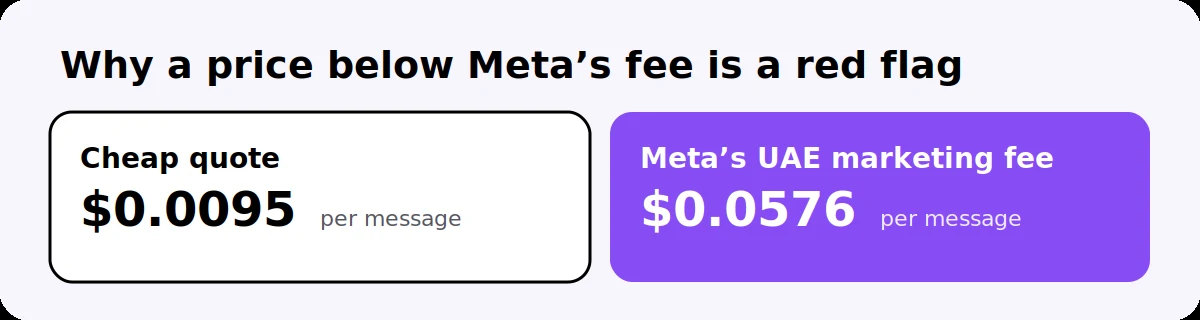
Because Meta charges for every message delivered through the official API, and no official provider can sell below that. In the UAE, a marketing message costs Meta’s list rate of $0.0576, so a quote of $0.0095 per message can only come from a tool that is not using the API.
The official route is often cheaper than it looks, though:
Many messages are free: everything customers send you, the first 1,000 service replies a month per number, and chats from click-to-WhatsApp ads for up to 7 days.
Utility messages cost far less than marketing, so confirmations and reminders are cheap.
A banned number is the most expensive outcome of all: weeks without your main sales channel, lost chat history and customers who cannot reach you.
Our GCC pricing guide has the current rates for each country.

Use the WhatsApp Business API, message only people who opted in, and let your sending limit grow with good results.
Connect through an official provider with a Meta login, keeping your current number through coexistence if you want.
Verify your business with Meta to move beyond 250 new conversations a day. Our verification checklist covers the documents for each GCC country.
Get templates approved for every message you start, such as offers and reminders.
Send only to opted-in contacts, and make it easy to opt out.
Segment your list so each group gets an offer that matches its interest.
Watch your quality rating and pause a campaign if blocks rise.
Our guide to sending bulk WhatsApp messages without getting banned goes through each step in more detail.
Signup uses a Facebook login and a Meta approval window, not a QR code scan
The WhatsApp account will appear in your own Meta Business Manager
Marketing messages go through templates that Meta approves
Pricing shows Meta’s per-message fees separately from the platform plan
Nothing is sold as “unlimited” or priced below Meta’s own fees
The provider can say which Meta partner programme it belongs to
You can take your number to another official provider if you leave
Opt-in and opt-out are handled inside the platform
Are WhatsApp bulk sender tools allowed?
Tools that automate the WhatsApp app or WhatsApp Web to send bulk messages break WhatsApp’s terms of service, and WhatsApp has said since 2019 that it will take legal action against those engaged in automated or bulk messaging abuse. The official WhatsApp Business API is the approved way to message customers at scale.
Can an unofficial WhatsApp sender get my number banned?
Yes. WhatsApp detects automated sending from the app and WhatsApp Web and bans numbers, often without warning. Getting a number back depends on a review and is not guaranteed.
How do I know if a WhatsApp API provider is official?
An official provider connects you through a Meta login, the WhatsApp account appears in your own Meta Business Manager, marketing messages use templates Meta approves, and pricing follows Meta’s per-message fees.
Why is the official WhatsApp API more expensive?
Meta charges for each message delivered through the API, so no official provider can sell messages below Meta’s fees. Many messages stay free, including customer messages, 1,000 service replies a month per number and chats from click-to-WhatsApp ads.
Is there a free official WhatsApp bulk sender?
No. Access to the API is free, but Meta charges for each marketing, utility or authentication message your business sends. Tools offering free or unlimited bulk sending are not using the official API.
Can I move my number from an unofficial tool to the official API?
Usually yes, if the number has not been banned. Stop using the tool and unlink it from WhatsApp, then connect the number through an official provider, keeping the WhatsApp Business app through coexistence if you want.
FlowFlex is an official Meta Business Partner and WhatsApp Business Solution Provider. You sign up with your own Meta account, your WhatsApp account stays in your Business Manager, and every campaign uses templates Meta approves, with Meta’s fees shown clearly.
Start your 14-day free trial or message us on WhatsApp and we will review how you send today.


