Bans and safety

Nafih C
Product team, FlowFlex
Updated
15 min read
A lighting and sanitary-ware showroom in Oman runs a 3-day offer every month. The owner sends it to 8,000 to 9,000 customers straight from the WhatsApp Business app on his phone. It worked for a while. Then one morning the app showed a message: This account is not allowed to use WhatsApp. It has happened to him twice now.
If your WhatsApp Business number has been banned, or you are worried it will be, you are not alone. A banned number means lost chats, lost contacts, and customers who can no longer reach the number printed on your shop sign and business cards.
This guide explains why WhatsApp bans business numbers, what you can and cannot get back, and how businesses in the UAE, Saudi Arabia, Qatar, Kuwait, Bahrain and Oman send thousands of messages a day without putting their number at risk.
Quick answer: why was my WhatsApp Business number banned?
WhatsApp bans a business number when its activity looks like spam. The usual causes are bulk sends from the WhatsApp Business app, unofficial bulk-sender tools, messaging people who never opted in, too many blocks and reports, and sudden spikes in volume. You can request a review in the app, but recovery is not guaranteed. To send thousands of messages safely, use the official WhatsApp Business API, message only opted-in contacts, and let your daily limit grow.
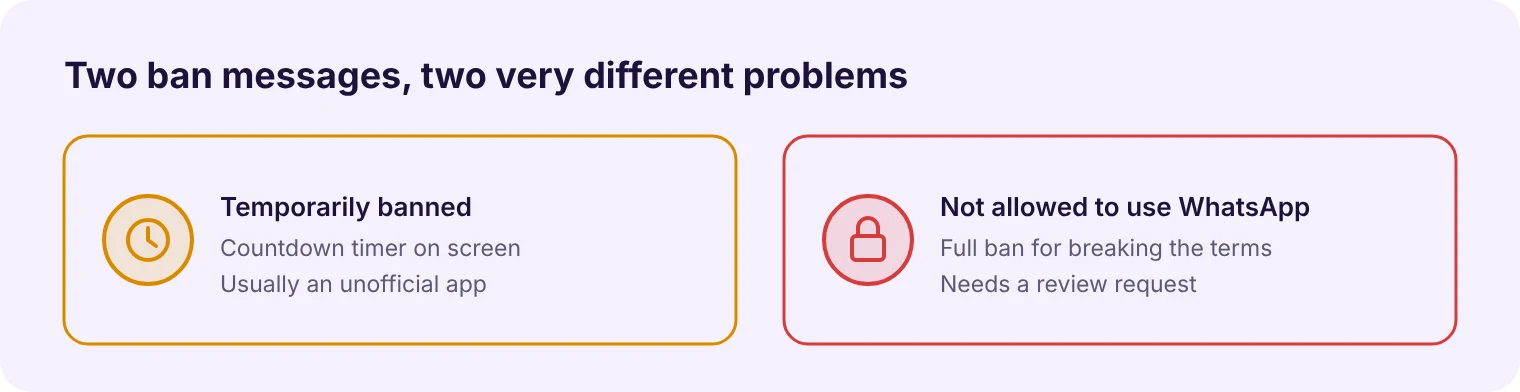
A WhatsApp ban means your number can no longer use WhatsApp, either for a set time or until WhatsApp reviews it. Check which message you see, because each one has a different fix.
Temporary ban, restriction or permanent ban
What you see | What it usually means | What to do |
|---|---|---|
"Temporarily banned" with a countdown timer | WhatsApp has detected an unofficial or modified app (such as GB WhatsApp or WhatsApp Plus) on your number | Wait for the timer to end, back up your chats, and move to the official app |
"This account is not allowed to use WhatsApp" | A ban for breaking WhatsApp's Terms of Service, for example spam or scams | Request a review from inside the app (more on this below) |
"Your account is restricted right now" | A restriction, not a ban. You can still reply in existing chats, but you cannot start new ones for a while | Stop messaging new contacts, wait for it to lift, and fix what triggered it |
WhatsApp's own help centre says it bans accounts when it believes the activity violates its Terms of Service, with spam and scams named as examples. For modified apps, WhatsApp has said these violate its Terms of Service and that it cannot check their security.
What "account restricted" means
WhatsApp can now restrict an account instead of banning it. WABetaInfo first spotted this account restriction feature in 2024, described as a temporary penalty that blocks new chats for a set time. While restricted, you can answer calls, reply to messages and keep chatting in existing chats and groups. You cannot start new chats until the app tells you the restriction has lifted.
Treat a restriction as a final warning. Stop cold outreach, check that everyone on your lists opted in, and move bulk sends to the official API before it turns into a ban.
What you lose when your number is banned
Your chat history. Every conversation with every customer lives on that number. A ban locks you out of all of it.
Your contacts. Customers who saved your number can no longer reach you there.
The number itself. It is on your signboard, your ads, your Google listing and your invoices. Changing it costs more than the new SIM.
That last point is why most business owners wait weeks for a review instead of moving on. Sometimes waiting is the right call, and sometimes it is not. We cover how to decide below.
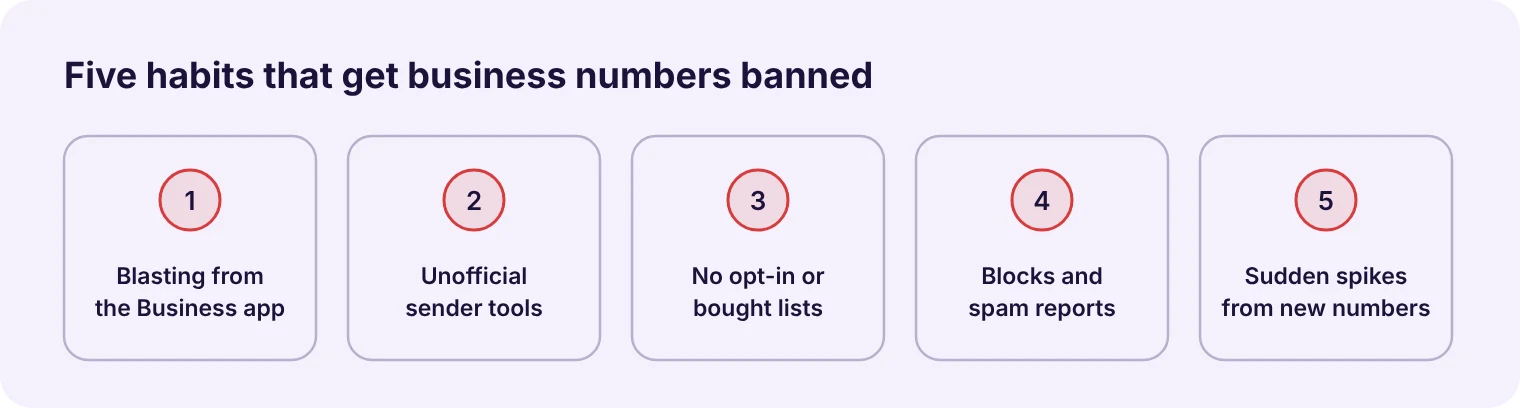
WhatsApp bans business numbers that behave like spam, and it does not tell you which message triggered the ban. But in our calls with businesses across the GCC, the same five causes come up again and again.
1. Sending bulk messages from the WhatsApp Business app
Most cases of a WhatsApp account banned for bulk messaging start here. The free Business app was built for one-to-one chats with customers, not campaigns. Its broadcast lists hold up to 256 contacts each, and only people who have saved your number receive the message.
To get around that, many owners create list after list, or forward the same offer to hundreds of chats by hand. A spare-parts trader we spoke to, selling to customers in Africa and Russia, found his number blocked every time a send reached about 200 people.
WhatsApp is also tightening this further. In October 2025 Meta confirmed it was testing a monthly cap on messages sent to people who do not reply, aimed at accounts that blast messages.
2. Using unofficial bulk-sender tools
"Bulk WhatsApp sender" software, Chrome extensions that automate WhatsApp Web, and modified apps like GB WhatsApp all break WhatsApp's terms. They are cheap and they work for a few days. Then they stop.
A furniture and flooring retailer in Bahrain told us his previous tool got his number banned after about 50 messages. Several prospects have shown us quotes for tools far cheaper than any official provider. The price difference is real, and so is the risk.
3. Messaging people who never opted in
Bought lists, numbers scraped from directories, and old customer databases from years ago are the fastest way to collect blocks and spam reports. Under WhatsApp's Business Messaging Policy, a business may contact someone only if that person gave their number and agreed to receive messages from that business.
4. Too many blocks and spam reports
Every time a recipient blocks you or taps "Report", WhatsApp counts it. A few are normal. A spike after one campaign tells WhatsApp that people did not want your message, and that is what leads to restrictions and bans.
5. Sudden volume from a new or quiet number
A number that sends 20 messages a day and then 3,000 in one evening looks like a hacked or spam account. New numbers are watched most closely. Volume should build up over days and weeks, not overnight.
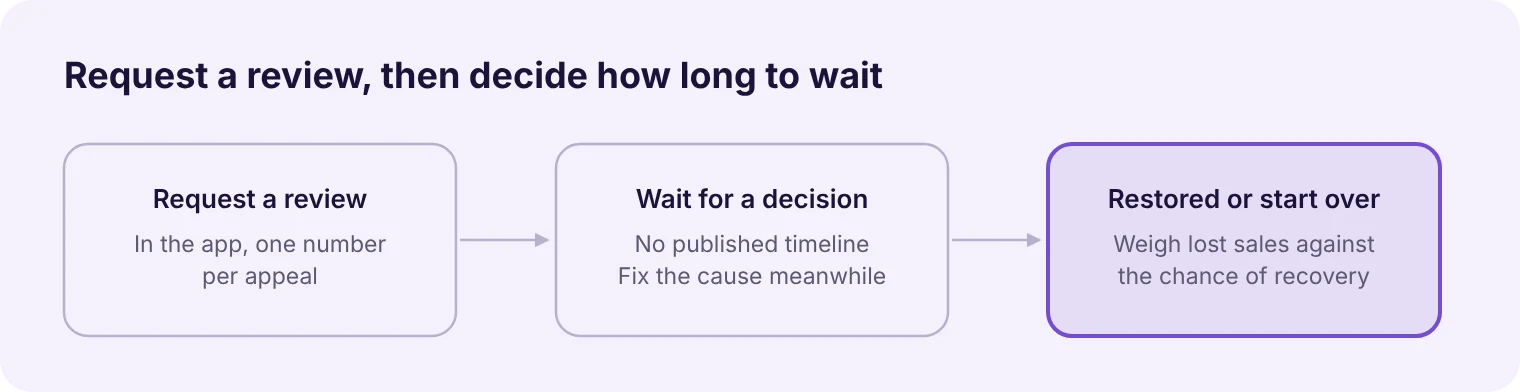
You request a review inside the WhatsApp app, and WhatsApp decides whether to restore the number. There is no guaranteed fix, and anyone who promises one for a fee is guessing.
How to request a review
Open WhatsApp on the banned number.
Tap Request a review.
Enter the 6-digit code WhatsApp sends by SMS.
Explain how your business uses WhatsApp: who you message, why they expect to hear from you, and what you have changed. Keep it short and factual.
Submit, then check the app for the result.
WhatsApp says it reviews one phone number per appeal and that sending more than one request does not speed things up. If your number is on the WhatsApp Business Platform through a provider, the appeal goes through Meta's business tools instead, so ask your provider to file it.
Cannot open the app? Use WhatsApp's official contact page instead. Tap Contact us under WhatsApp Support and it opens a pre-filled email addressed to the right team. Emails you write yourself to old addresses such as support@whatsapp.com are no longer a reliable route. Genuine replies only come from addresses ending in @support.whatsapp.com, so ignore anyone who offers a paid unban.
Example review message
Keep it short, honest and specific. Adapt this to your situation rather than copying it word for word:
Hello WhatsApp team. My number [+971 XX XXX XXXX] belongs to [business name], a [type of business] in [city]. We use WhatsApp to reply to customers who contact us and to send updates to customers who asked to hear from us. We believe the ban may be linked to [a large broadcast from the Business app / a third-party tool we have now removed]. We have stopped bulk sending from the app and will only message customers who opted in. Please review our account.
Name the likely cause and what you changed. A vague message that only says the ban was a mistake gives the reviewer nothing to act on.
What to expect: timelines and no guarantees
WhatsApp does not publish a review timeline. A clinic we work with lost its number in early August. It started working again roughly two months later, and Meta never gave an estimate in between.
If the ban came from a clear policy breach, such as a bought list or an unofficial tool, appeals are less likely to succeed. Fix the cause before you appeal, and say what you fixed.
When to stop waiting and start again
Ask yourself two questions:
How much business are you losing each week the number is down? For a showroom running monthly offers, two months of silence can cost more than reprinting signs.
Did you clearly break the rules? If so, recovery is unlikely and a new number on the official platform is usually the faster path.
If you do move to a new number, tell customers through every other channel you have: Instagram, your website, SMS and email. And set the new number up properly from day one, as described below.
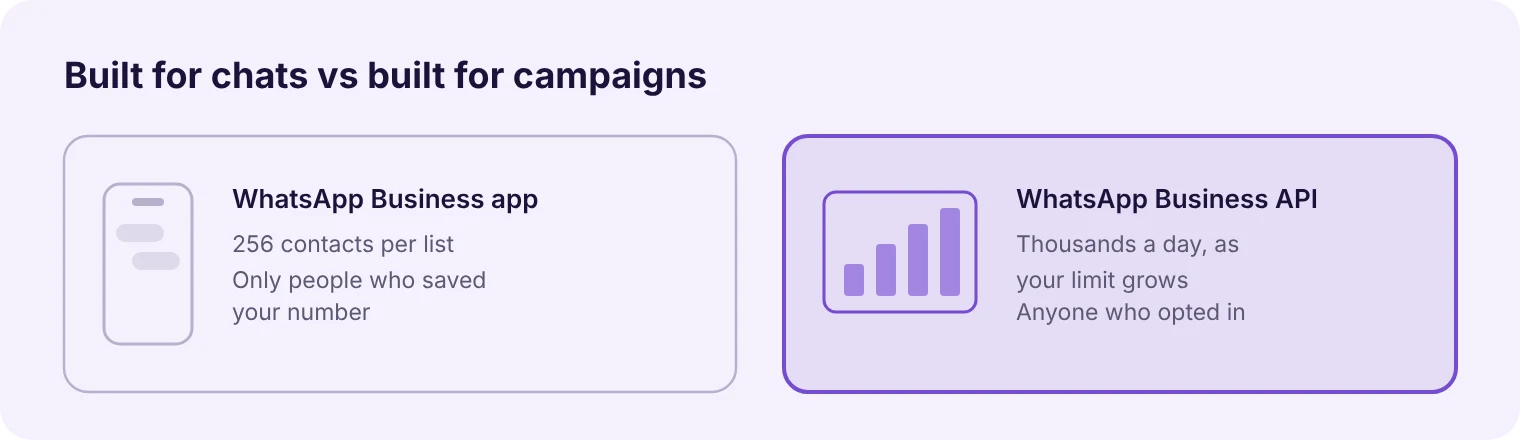
The safest way is the official WhatsApp Business API. The API (Meta now calls it the WhatsApp Business Platform) is the route Meta built for businesses that message customers at scale. You reach it through an official Meta partner, which gives you a dashboard to run broadcasts, automate replies and share one inbox across your team.
How it differs from the Business app
WhatsApp Business app | WhatsApp Business API | |
|---|---|---|
Built for | One-to-one chats from a phone | Messaging customers at scale |
Broadcast size | 256 contacts per list | Thousands a day, growing with your track record |
Who receives broadcasts | Only people who saved your number | Anyone who opted in, saved or not |
Message approval | None | Marketing messages use templates Meta approves |
Team access | One phone, a few linked devices | Many staff in one shared inbox |
Cost to send | Free | Meta charges per delivered message |
Why the API protects your number
On the API, bulk sending is the intended use, not a workaround. Your marketing messages go out as templates that Meta has reviewed, under your business name, within a daily limit Meta sets for your account. Meta watches how customers react and warns you early if quality drops, long before a ban.
That does not mean anything goes. The same opt-in and quality rules apply, and a business that spams on the API will still lose its number. The difference is that you get warnings and time to fix things.
Can you keep using the WhatsApp Business app?
Yes, in most cases. Meta's coexistence feature lets you connect your existing Business app number to the API and keep chatting from your phone. According to Meta's documentation, up to 6 months of chat history can be synchronized, and messages sent from either side stay in sync. You need Business app version 2.24.17 or later.
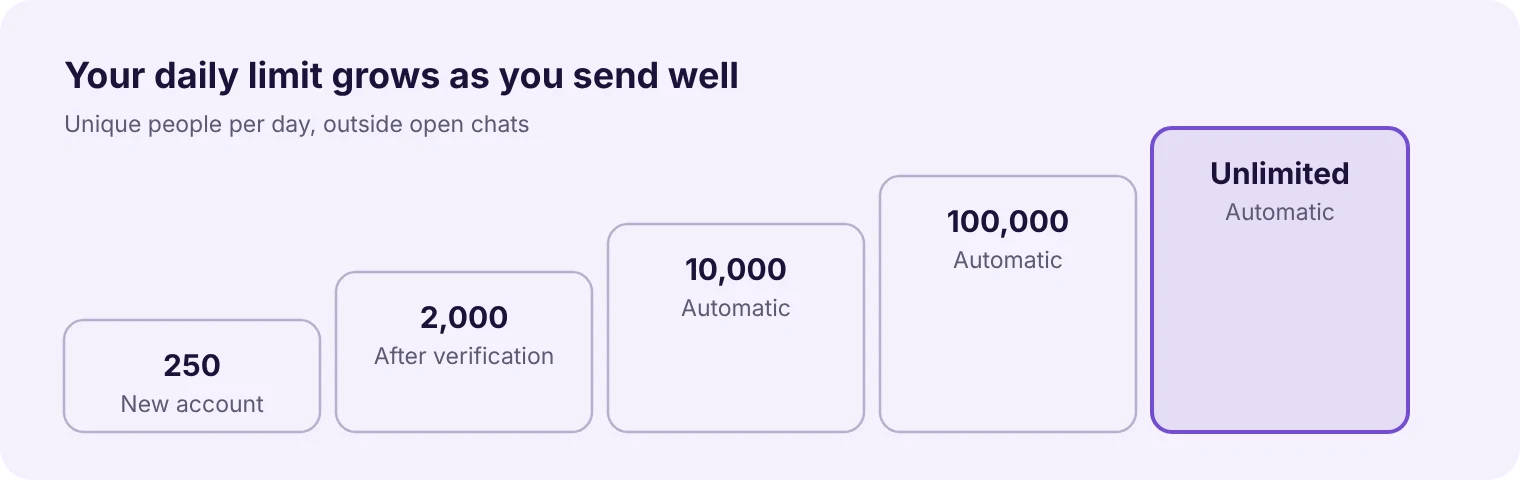
Use the official API, verify your business, send approved templates only to opted-in contacts, and let Meta raise your daily limit while your quality stays high. Reaching 10,000 people a day this way is realistic, but not on day one. Meta raises your limit as you prove that customers want your messages. Here is the path.
1. Verify your business with Meta
Every new business portfolio starts with a limit of 250 unique people per day outside an open customer chat. Verifying your business in Meta Business Manager is one of three ways to move up to 2,000. In the GCC this usually means uploading your CR or trade licence, and the business name and address must match the document exactly. Meta's business verification guide explains the steps.
2. Get your message templates approved
Any message you start (an offer, a reminder, a follow-up) must use a template that Meta has approved. Templates get rejected for vague wording, missing variables, or marketing content filed under the wrong category. Write them the way you would speak to a regular customer: clear, short, and with one obvious next step.
3. Let your limit grow on its own
The limits step up from 250 to 2,000, 10,000, 100,000 and unlimited. They are set for your whole business portfolio and shared by every number in it, so adding a second number does not add capacity.
Once you are at 2,000, Meta raises your limit one step within 6 hours when two things are true:
your messages are high quality across all numbers and templates, and
in the last 7 days you used at least half of your current limit.
So a business sending 1,000 or more messages a day with good quality can reach 10,000 quickly. A business that sends 5,000 messages once a month and nothing in between will not.
4. Segment your list instead of blasting everyone
One customer of ours sent an offer to about 1,800 contacts collected from three years of Instagram ads. Only 50 to 100 replied, and the broadcast was soon paused. Nobody had recorded which of the business's three products each contact had asked about, so everyone got the same message.
The fix was simple: ask one or two questions in the first chat, tag each contact by their answer, and send each group the offer that matches their interest. Relevant messages get read and answered. Irrelevant ones get blocked.
5. Watch your quality rating
Meta gives every business number a quality rating of green, yellow or red, based on how customers reacted over the past 7 days, including blocks and reports. Check it in WhatsApp Manager before every big send.
Templates are rated too. When a template drops to the lowest rating, Meta pauses it for 3 hours, then 6 hours, and disables it on the third time. A paused template is a warning sign, not a ban, so stop the campaign and find out why people are reacting badly.
6. Make opting out easy
A customer who cannot find a way to stop your messages will block you or report you. A clear "Stop promotions" button gives them a better option and protects your rating. WhatsApp's policy also requires you to honour opt-out requests.
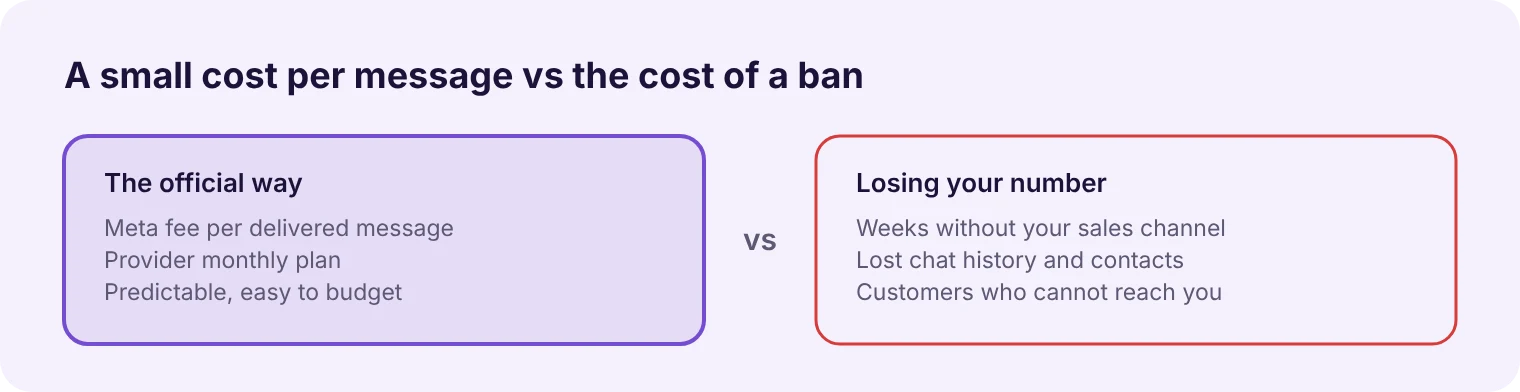
The WhatsApp Business API costs a per-message fee from Meta plus your provider's monthly plan. The Business app is free, and that price gap is the main reason businesses stay on risky tools for too long.
On the API, Meta charges for each delivered message, and the price depends on the message type and the recipient's country. Marketing messages cost the most. Since October 1, 2026, Meta also charges per message for replies sent inside an open customer chat, which had been free before. Messages customers send to you remain free.
On top of Meta's charges, your provider charges a monthly plan for the platform itself.
Is it worth it? Compare it with the cost of a banned number: weeks without your main sales channel, lost chat history, and customers who cannot reach you. For most businesses sending regular offers, the official route pays for itself the first time it prevents a ban. Meta publishes current rates for each country on its WhatsApp pricing page.
Run through this before every campaign. Screenshot it and share it with whoever sends your messages.
Every contact on the list agreed to hear from you, and you know when and how
No bought, scraped or years-old lists
You are sending through the official API, not the Business app or a bulk-sender tool
Your business is verified with Meta
The template is approved and filed under the right category
The list is segmented, and each group gets an offer that matches its interest
The send fits within your current messaging limit
Your number's quality rating is green
The message has a clear way to opt out
Someone is ready to answer replies quickly once it goes out
Why was my WhatsApp Business account banned without warning?
On the Business app, there is often no warning. WhatsApp's systems act on patterns such as bulk sends, unofficial tools and spam reports. On the official API you usually get earlier signals, such as a falling quality rating or paused templates, before a number is restricted.
How long does a WhatsApp ban last?
A temporary ban for using an unofficial app shows a countdown timer and ends when it runs out. A full ban lasts until a review succeeds, and WhatsApp does not publish how long reviews take. Some numbers never come back.
Can I use the same number on the WhatsApp Business API after a ban?
Get the ban lifted first. In our experience, a number needs to be working again before it can be connected to the API. Once it is restored, you can move it to the API, and coexistence lets you keep using the Business app on it too.
How many messages can I send per day on the WhatsApp API?
New accounts start at 250 unique people per day outside open chats. After business verification you can reach 2,000, then 10,000, 100,000 and unlimited as Meta sees consistent, high-quality sending. Replies inside a chat the customer started do not count toward this limit.
Will the official API stop my number from ever being banned?
No. The API makes bulk messaging allowed, not risk-free. If you message people who never opted in, or send content they keep blocking, you can still lose the number. The difference is that the API gives you warnings and time to correct course.
Why are my WhatsApp broadcast messages not being delivered?
On the WhatsApp Business app, broadcasts only reach people who have saved your number in their phone contacts. Anyone who has not saved it never receives the message, and you get no error. On the WhatsApp Business API, approved template messages reach opted-in customers whether or not they saved your number.
What is the difference between the WhatsApp Business app and the WhatsApp Business API?
The Business app is a free phone app for one-to-one chats, with broadcast lists of up to 256 saved contacts. The Business API is Meta's platform for messaging at scale through a provider, with approved templates, a shared team inbox and automation. Meta charges per delivered message on the API.
What does "Your account is restricted right now" mean on WhatsApp Business?
It means WhatsApp has limited your account instead of banning it. You can still reply in existing chats and answer calls, but you cannot start new chats until the restriction lifts. It is usually triggered by spam-like behaviour, such as messaging many new contacts in a short time.
If your number has been banned, or you are sending more than a few hundred messages a month from the Business app, it is time to move to the official route.
FlowFlex is an official Meta Business Partner that helps businesses across the GCC run WhatsApp broadcasts, automated follow-ups and a shared team inbox on the WhatsApp Business API. Our team handles Meta verification and template approval with you, and can connect your existing Business app number through coexistence.
Book a free setup check: message us on WhatsApp and we will review how you send today and what to change before your next campaign.